Blog · By The Packaging Vista Team · June 20, 2026
CMYK vs. Pantone: Getting Brand Colors Right in Print
Screens and presses show color in different ways. So the color you approve on a monitor is not always what prints. Unless you set it up right.
A logo that glows on screen can land flat or shifted on a printed box. A brand color that looks perfect in your packaging design file can vary run to run if it is not specced right – and inconsistent color is the fastest way to weaken product branding across restocks.
This article goes deeper on color than our custom box printing guide and artwork and dieline guide. It covers CMYK, Pantone, and how to keep your brand color the same across every custom printing run.
Color-model cheat sheet:
- RGB is for screens only – never send an RGB file to print.
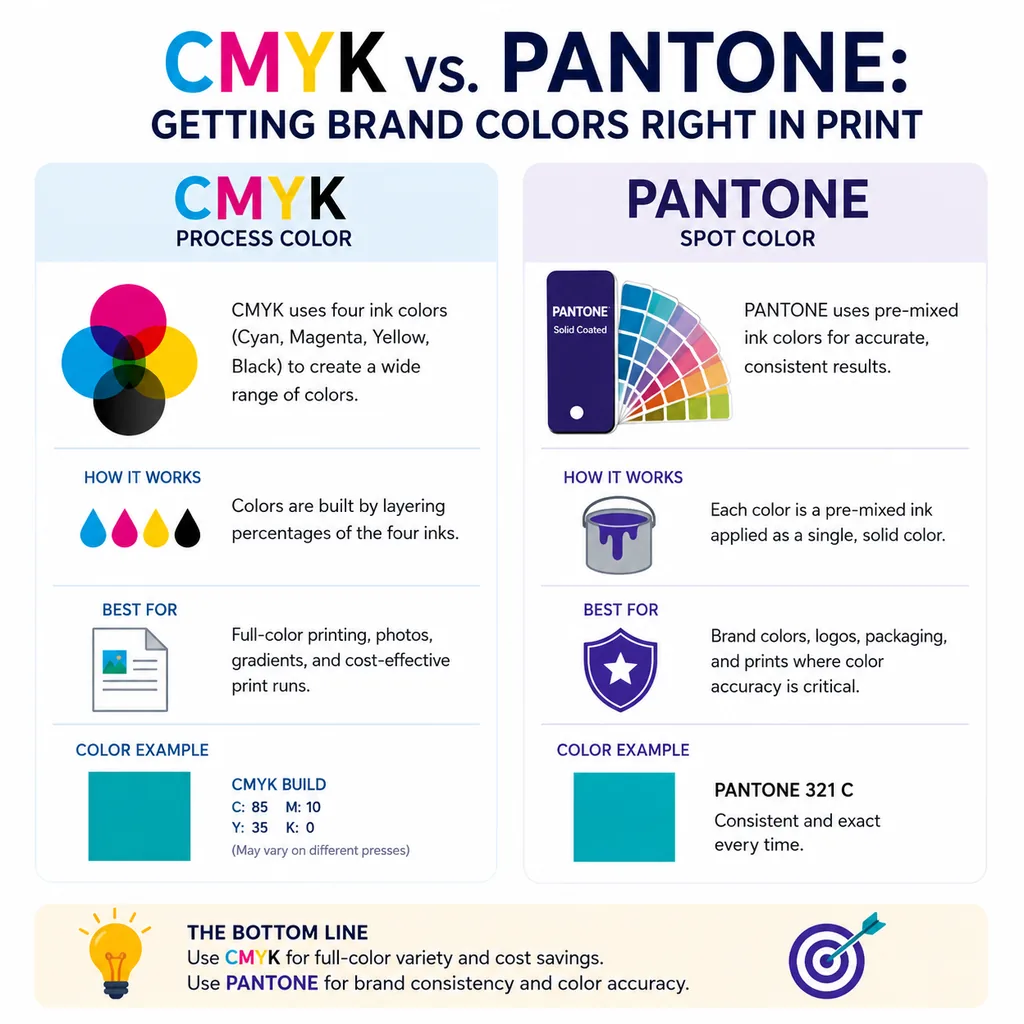
- CMYK mixes cyan, magenta, yellow, and black inks; good default for most printed cartons.
- Pantone (PMS) is a premixed spot ink for exact brand color, run-to-run.
- Proof every run – ink and stock combine differently, and a screen can lie.
- Coated vs. uncoated stock shifts the same ink noticeably; specify the Pantone C or U code.
- Combine CMYK + Pantone when only the logo needs exact color and the rest is process art.
Why not RGB?
Screens use RGB (red, green, blue light). But presses use ink. Designing in RGB and printing it lets colors shift. Often duller than the screen, because light can make vivid hues that ink cannot mix.
Always build packaging art in a print color model. If you start in RGB and convert at the end, expect the brightest blues, greens, and oranges to soften. It is better to design in a print space from the start and judge color against a printed proof, not your monitor.
What is CMYK, the four-ink standard?
CMYK (cyan, magenta, yellow, black) mixes four inks to make full-color images and most colors. It is the standard for photos and multi-color art. And it is cheap.
Almost any art can be printed in CMYK. So it is the default for boxes with photos, gradients, or many colors. The trade-off is that some set colors — mainly bright, rich brand hues — can drift a bit between runs. They are built from a mix of four inks rather than one fixed ink.
What is Pantone: exact brand color?
Pantone (PMS) spot colors are pre-mixed inks that make an exact, steady color every run. That is the safest pick for a set brand color or logo. If your brand lives or dies on one exact color, spec a Pantone.
The ink is mixed to a recipe before it ever touches the press. So a Pantone red looks the same on this order as on your reorder next year. Spot colors also let you hit some vivid hues that CMYK cannot make clean.
CMYK vs. Pantone at a glance
| CMYK (process) | Pantone (spot) | |
|---|---|---|
| Best for | Photos, gradients, multi-color art | Exact brand colors, logos |
| Consistency | Can shift slightly run to run | Exact match every run |
| Color range | Broad, but misses some vivid hues | Hits specific bright/specialty colors |
| Cost | Economical for full-color work | Adds a dedicated ink |
Many boxes use both. CMYK for the imagery. And one or two Pantone spot colors for the logo and key brand color.
How do you keep color steady across runs?
Build art in CMYK. Call out a Pantone reference for any color that must be exact. Tell us your Pantone and we match it on press. So every reorder looks the same.
The single most reliable habit is to spec your brand color as a named Pantone in your brand guidelines. Then reference that same code on every order. That way nobody is eyeballing a screen to recreate it. See finishes for how color and finish interact. Matte, gloss, and soft-touch coatings can subtly change how the same ink reads.
Why do you proof before the full run?
The safest way to confirm color is to look at it printed, not on a screen. Reviewing a proof catches a shifted hue, a too-dark photo, or a brand color that needs a tweak before you commit to the full run.
Light changes how color looks. So judge a proof under steady, neutral light rather than at your desk. We are a US-based supplier. We proof the color and supply a layout to approve before we print. So there are no surprises on the finished box. For art setup that supports clean color, see our vector vs. raster guide and bleed and safe zone guide.
When should you combine CMYK and Pantone?
The two systems are not either/or. The strongest packaging often uses both.
A common setup runs full-color CMYK for product photos or drawn backgrounds. Then one or two Pantone spot colors are held for the logo and the single brand color that must never drift. That gives you rich imagery and a rock-solid brand color at once.
Spot colors are also the route to effects CMYK cannot pull off. Think metallics or some ultra-bright hues. That is why some premium boxes spec a metal Pantone alongside process print. Tell us how your art is built and we will advise which colors to hold as spot.
How do finishes and stocks change color?
The same ink can look different based on what it is printed on and what is layered over it. Uncoated kraft soaks up ink and mutes color. A coated white stock keeps it bright and rich.
A matte or soft-touch lamination slightly softens color. A gloss coat deepens it. Spot UV over a color makes it pop. So it is worth checking your brand color on the real stock and finish you plan to use, not just on a plain proof. Our box finishes guide covers how each coating works with print. And our paper weights and thickness guide covers how stock choice shifts the look.
Frequently asked questions
Should I design my box in CMYK or Pantone?
Design in CMYK for full-color artwork and photos, and specify a Pantone for any color that must match your brand exactly. Many boxes combine both.
Why did my printed color look different from my screen?
Screens use light (RGB) and presses use ink, so colors can shift – usually duller – if artwork is built in RGB. Build in a print model and judge against a printed proof.
How do I make sure reorders match?
Specify your brand color as a named Pantone and reference that code on every order. We match the Pantone on press so each run looks the same.
Can you match my exact brand color?
Yes. Share your artwork and Pantone references and we proof the color before printing, so the finished box matches what you approved.
What is Pantone (PMS) in packaging print?
Pantone (PMS) spot colors are pre-mixed inks matched to a set recipe. Unlike CMYK, which builds a color from four inks on press, a Pantone ink is one exact color mixed before it touches the press. That gives a rock-solid, run-to-run match – ideal for a fixed brand color, a logo, or a specialty hue like a metallic or ultra-bright shade CMYK cannot mix clean.
Why is CMYK the default for printed boxes?
Because CMYK covers photos, gradients, and multi-color art with just four inks, so it is the most cost-effective way to print full-color packaging. Almost any artwork translates. The trade-off is that some vivid brand hues can drift slightly between runs, since the color is mixed from four inks each time. That is why brands add a Pantone spot ink for the one color that must never move.
How much does adding a Pantone spot color add to a box order?
A dedicated Pantone spot ink adds a small line to the quote – more than pure CMYK but usually far less than a premium finish like foil or embossing. The exact impact depends on box size, run length, and whether one or two spots are held. There are no die, plate, or setup fees at PackagingVista. Send your art and Pantone code for a same-day quote.
Is Pantone worth it for a small brand?
If your brand color is a core identity cue – yes. A named Pantone is the only way to guarantee the same red or blue this year and next year, across every SKU and reorder. If your art is mostly photos, gradients, or shifting palettes, CMYK alone often works fine. Many small brands run CMYK on the range and hold one Pantone spot just for the logo. That gets the best of both.
Get your brand color right
Related reading from OLX Packaging: how color psychology shapes packaging design.
Share your artwork and Pantone references and we will proof the color before printing, on boxes built with a free dieline and no die or plate fees. Start with our artwork guide, then request your free quote or contact our team.